 XFast team
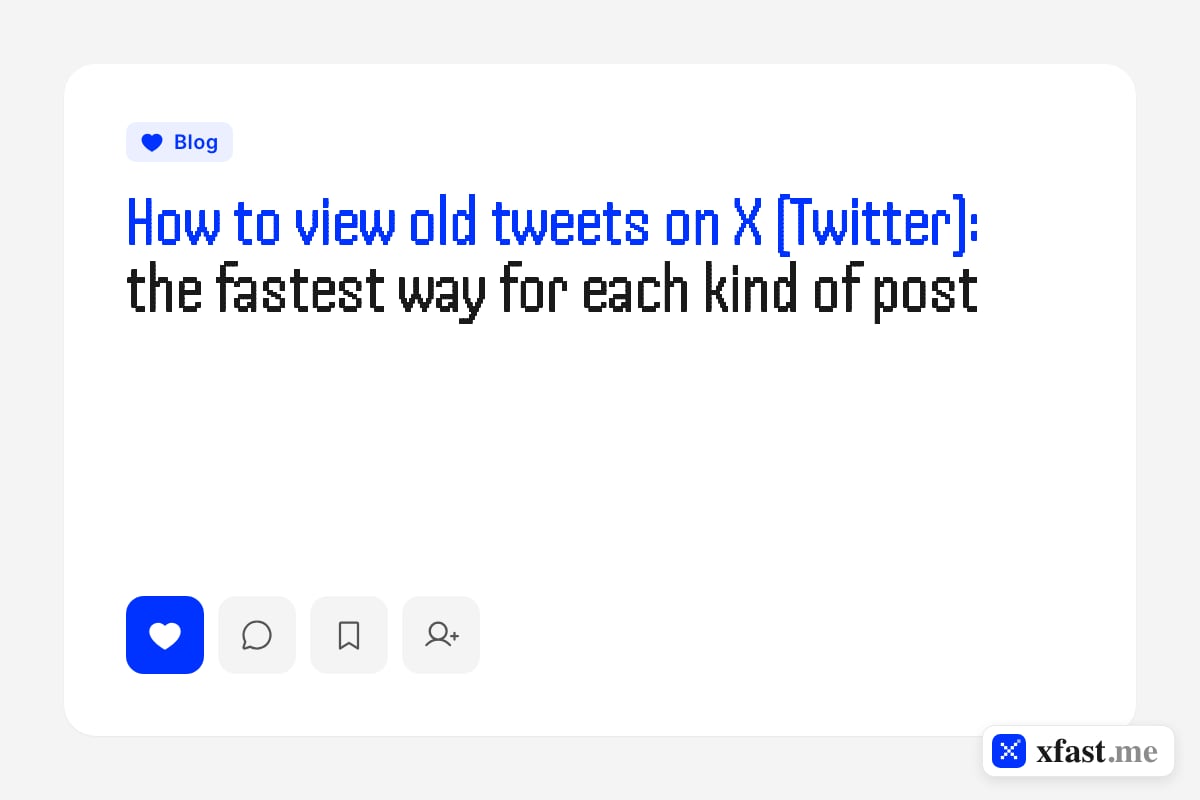
| What you want to find | The fastest way |
|---|---|
| A post of any public account from a known month | Search from:name since: until: and open Latest |
| Your own post, with a word you remember | Search from:yourname plus that word |
| Your very first post | Read the Joined date on your profile, search that month, scroll to the bottom of Latest |
| Everything you ever posted, with pictures and video | Download your archive and open it in a browser |
| A post you deleted | Look in your archive, which holds only what X still kept |
| A post someone else deleted | Paste its address into the Wayback Machine, which works only if a copy was saved |
| A post you scrolled past and never saved | Search the words you remember, since X keeps no list of viewed posts |
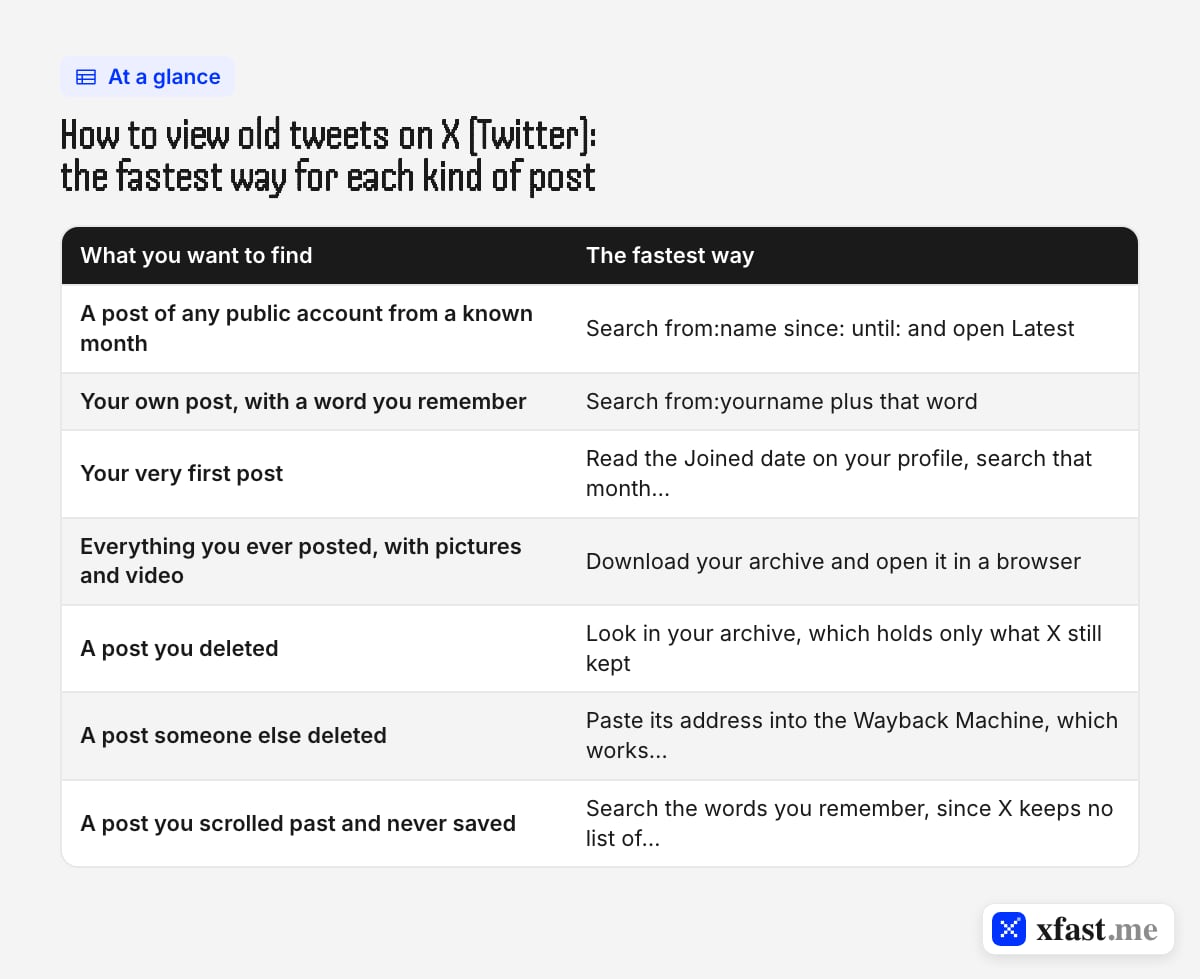
A date window plus the Latest tab finds an old post of any public account.
Search reaches back to the first public post in 2006. Without a date it shows the newest and the most popular posts, so the date does the work.
- Sign in on x.com or in the app, because search needs a signed-in account.
- Type the account and a window in the search box:
from:nasa since:2019-07-01 until:2019-08-01. - Press Search, then open the Latest tab to see the posts in time order.
- Add a word from the post to narrow the list:
from:nasa "Apollo 11" since:2019-07-01 until:2019-08-01. - If the list is empty or slow, cut the window to one month, or widen it by a day on each side.
The form builds the same query without typing. Run any search, press Advanced search under the search filters or go to x.com/search-advanced, fill From these accounts and the Dates fields, and press Search.
Eight operators cover almost every search for an old post.
Dates are written year, month, day, as 2019-07-01. A date is a whole day, and X draws the day boundary in its own time zone.
from:posts by one account:from:nasato:replies sent to an account:to:nasasince:posts on or after a day:since:2019-01-01until:posts before a day, so the day itself is left out:until:2020-01-01- Quotes find an exact phrase:
"moon base" filter:mediakeeps posts with a picture or video:from:nasa filter:mediamin_faves:keeps posts with at least that many likes:from:nasa min_faves:1000-filter:replieshides replies and leaves original posts:from:yourname -filter:replies
Your own archive holds everything you posted, and it is the one place to read it all.
Search shows what it chooses to show. The archive is a copy of your account, with posts, media and the rest.
- On the web, press More, then Settings and privacy, then Your account.
- Choose Download an archive of your data and confirm with your password and the code X sends you. In the iPhone app the path is Settings and privacy, Account, Your X data.
- Press Request archive. X emails you when the file is ready, after hours or a few days.
- Download the file, unzip it and open
Your archive.htmlin a browser. - Search by word or scroll back to your first post.
Deleted posts come back only from a copy made earlier, and viewing history does not exist.
X shows no deleted post to anyone, and no tool undeletes one. Three places may still hold a copy.
- For your own post, open your archive and look for it there.
- For anyone's post, paste its address or the profile address into the Wayback Machine, and try the twitter.com form of the address too.
- Search the exact words in a search engine and look at the saved version of the result.
For a post you only scrolled past, X keeps no list of viewed posts. Check places that remember your actions, in this order.
- Your Bookmarks and your Likes list.
- The Replies tab on your profile.
- The recent searches under the search box. On iPhone also the History tab.
- Your browser history, searched for x.com.
- A search with the words you remember in quotes, the account in
from:and a window of a few days.
Posts of protected accounts stay hidden from everyone except approved followers, in search and everywhere else.
An old post that earned likes once can earn them again.
Quote it with a new line, as in how to quote tweet on X, and give the new post a fast start. XFast gives free likes, comments, saves and follows from verified accounts of real people, by hand, with no X password.
Our search builder and date finder do the typing and the date work for you.
The X advanced search builder turns an account, a phrase and two dates into a ready query. The X post date finder reads the date and time of any post from its link.
 Buy X reposts doesn't make sense: they reach nobody, while free early likes bring real onesBuy X reposts and you get empty accounts that reach nobody. Real readers repost posts with early likes, comments and saves, free here.
 Current X Twitter trends: where to see them right now and how to join one with a post that gets seenCurrent X Twitter trends live under the Trending tab. See where to find them, change the location, read the post count and join with a post that gets seen.
 Optimal posting frequency on X Twitter for growth: 1 to 5 posts a day, set by your stageOptimal posting frequency on X Twitter for growth: posts and replies a day for new, growing and established accounts, plus spacing and timing.