 XFast team
The live list is one tab away in the app and one box away on the web.
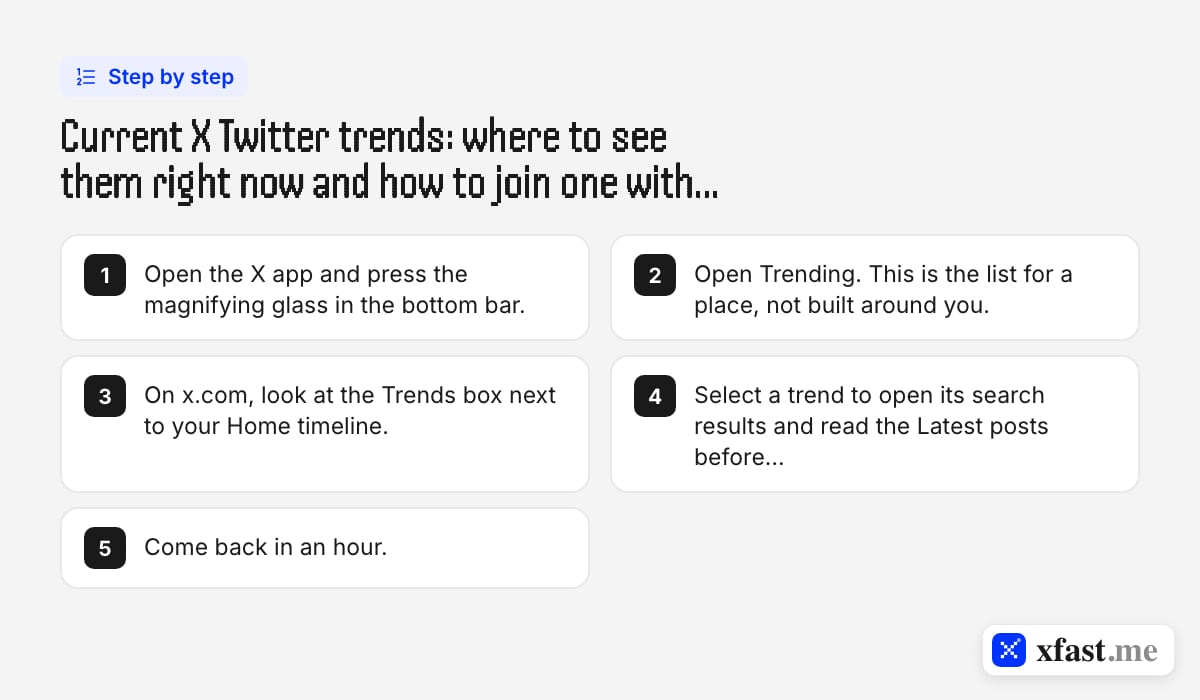
- Open the X app and press the magnifying glass in the bottom bar.
- Open Trending. This is the list for a place, not built around you. For you is a mix built on your interests, who you follow and your location. News, Sports and Entertainment filter the list by topic.
- On x.com, look at the Trends box next to your Home timeline. The magnifying glass in the left menu opens the same tabs.
- Select a trend to open its search results and read the Latest posts before you write anything.
- Come back in an hour. A trend that is still rising is a better bet than one that peaked while you were reading.
Changing the location gives you the list your readers see.
By default X builds trends around who you follow, your interests and where you are. If your readers live somewhere else, switch the place and watch that list.
- On x.com: click Change in the Trends box, then keep the default list or choose a nearby place or search for one.
- In the app: profile icon, Settings and privacy, Privacy and safety, Content you see, then the trends settings. Turn off Show content in your current location, open the locations list and pick a country or city.
A London account that sells to the US checks the US list in the US evening, not its own.
The post count and the category tell you how big a trend is and what it is about.
The number under a trend is the approximate count of posts about it. The label above it, such as Politics or Music, is picked automatically from what those posts say. X ranks topics that are popular now, not ones that have been popular for weeks, so a young trend with a small count can reach more people than a huge one that is already hours old. Read the label first: a trend outside your field is one to watch, not to join.
Five kinds of trends live for different lengths of time.
| Kind | Where it shows | How long it lives | Worth joining when |
|---|---|---|---|
| Breaking news | Trending, News | Hours | You work in that field and can add context a reader doesn't have yet |
| Live events such as matches, awards and launches | Sports, Entertainment, Trending | The event plus about an hour after | You post a reaction while it happens, from your own seat |
| Show and series hashtags | Entertainment, For you | The length of the episode, then a day of replies | You have an opinion about the episode, not a greeting |
| A name or a phrase from a meme | Trending, For you | A day or less | The joke or the point fits your voice and your niche |
| Weekly tags that return on the same day | Trending | One day, every week | You have a post that stands on its own with the tag attached |
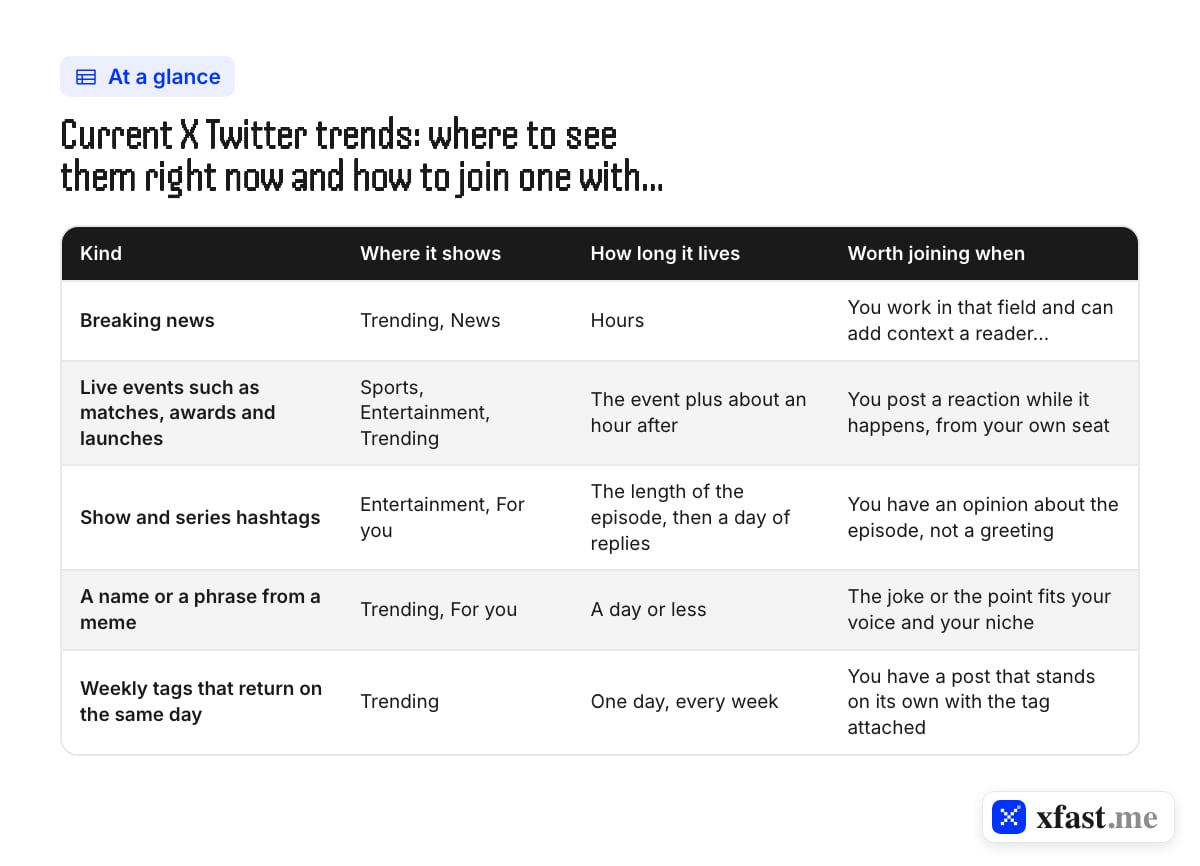
The shorter a trend lives, the faster the post has to go out. A reaction to a match goes up in minutes, a take on a series can wait until the evening.
A post joins a trend by using the exact phrase and adding one real take.
Copy the word or phrase exactly as the list shows it, with the hashtag if there is one. A different spelling lands you in a different conversation. Then write one post with one point of view: what you saw, what you think, what the reader should do with it. A post that only repeats the trend gives a reader no reason to open it, like it or save it. Our X post checker shows the weak spots in the draft, and the X hashtag generator helps when a trend has several spellings.
The first hour after you post decides whether the trend carries you.
Real people who like, comment on and save the post in its first hour tell X it is worth showing to more readers. Real readers then repost a post that gathered those early signals. Ask the colleagues and friends who know your niche to look at it within the hour. If you have no such people, XFast gives you the same start for free: likes, comments, saves and followers from verified accounts of real people, by hand and with no bots. No X password is needed, a public link to your post is enough. Start with free X likes and free X comments, and read what makes posts go viral on X for the formats that travel.
A trend you can't add to is a trend to skip.
If the topic sits outside your field, if you have no take, or if the trend is already a day old, leave it. A late, empty post under a trend costs you a slot in your own feed and brings no readers. Spend the hour on a post of your own, and check the list again tomorrow.
 Buy X reposts doesn't make sense: they reach nobody, while free early likes bring real onesBuy X reposts and you get empty accounts that reach nobody. Real readers repost posts with early likes, comments and saves, free here.
 Optimal posting frequency on X Twitter for growth: 1 to 5 posts a day, set by your stageOptimal posting frequency on X Twitter for growth: posts and replies a day for new, growing and established accounts, plus spacing and timing.
 Free Twitter X views come from real people opening your post, and the first hour is when they doFree Twitter X views come from real people opening your post. See where views come from, what raises them and what to do in the first hour.