 XFast team
Four steps quote any post, and the same four work everywhere.
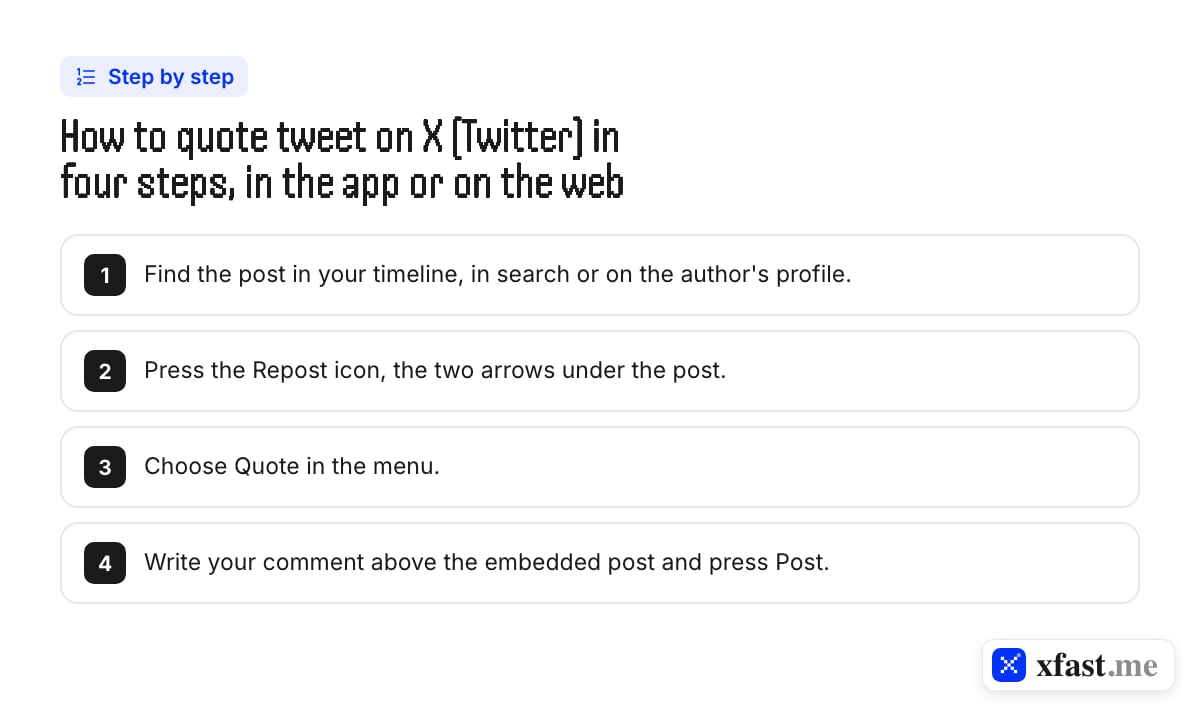
- Find the post in your timeline, in search or on the author's profile.
- Press the Repost icon, the two arrows under the post. On x.com, hover over the post first, then click it.
- Choose Quote in the menu. Some app versions label it Repost as Quote. The other option, Repost, shares the post with no comment.
- Write your comment above the embedded post and press Post. Some versions label the final button Repost.
The quote goes to your followers and lands on your profile as a post of its own.
A quote is your post, a repost is the author's post on your profile.
| Repost | Quote | |
|---|---|---|
| What your followers see | The original post, unchanged, with your name above it | Your comment, with the original embedded under it |
| Where it shows | Your profile and your followers' timelines | Your profile and your followers' timelines, with its own likes, replies and views |
| Your media | None | One GIF, up to four photos or a video |
| When to use it | You agree and have nothing to add | You add an opinion, context or a correction |
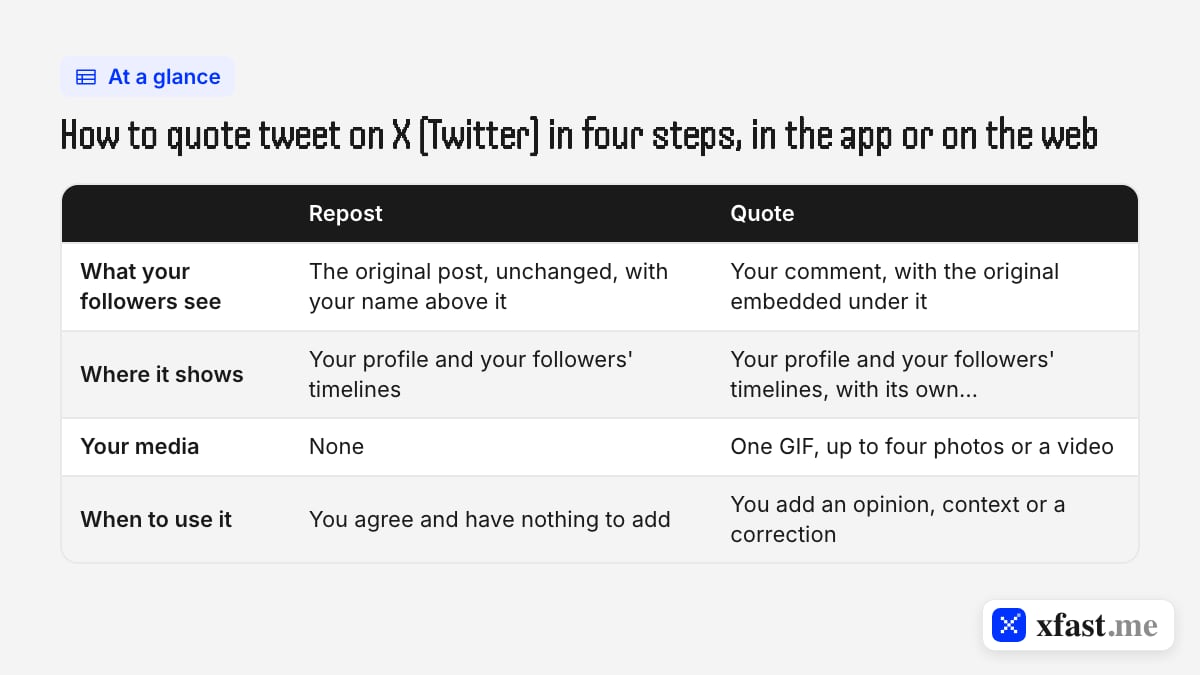
Pick a repost to pass a post on quickly and a quote when your words are the reason to read it. To drop a plain repost, press the highlighted Repost icon and choose Undo Repost. To drop a quote, delete it like any post of yours.
Quoting your own post brings an old post back in front of people.
- Open your profile and find the older post.
- Press Repost, then Quote.
- Write what changed: a new number, a result, a corrected line.
- Press Post.
The old post stays as it was, and the new one gets its own run in the feed. Quote a reply of yours the same way when you want all your followers to see an answer that only lived in a thread. Pair the quote with a fresh first line, and ask a friend to leave a comment under it early: free comments from real people are here.
A quote that carries a photo, a GIF or a video stays inside the same composer.
After you choose Quote, add the media in the composer before you press Post. One GIF, up to four photos or one video fits in a quote. Check the length of your text with our X character counter before you send.
A missing Quote option has four usual causes.
- Protected account. Posts with the lock icon cannot be reposted or quoted by anyone.
- A block. If the author blocked you, you cannot open the post to quote it.
- A deleted post or a suspended account. Open the post from its link: if it says it is gone, there is nothing to quote.
- An old app. Update the app, or open x.com. Copying the post's link into a new post of yours also gives an embedded card.
A quote with a real opinion is a comment and a share at once.
Your followers read your take, and the original author sees the post pass on to people they do not reach. A quote that only says "this" adds nothing, so write one concrete line: what you agree with, what you add, what you would change. When someone replies to your quote, the original author is not added to that conversation automatically, so mention their @handle if you want them in it.
Quotes travel further when the post gets early likes and comments. Ask for them from people who will mean it: free likes from verified real people arrive by hand, with no X password, and our guide on what makes posts go viral on X shows where the first hour fits.
 Buy X comments doesn't make sense: it gives you only numbers, while real comments are free hereBuy X comments and you get 'nice post' lines from empty accounts. Real people write comments on your post by hand, free here.
 Get free X reposts from real readers by giving a post an early startGet free X reposts from real readers: what makes people repost, who to ask, what to post and the first-hour plan, with free early likes and comments.