 XFast team
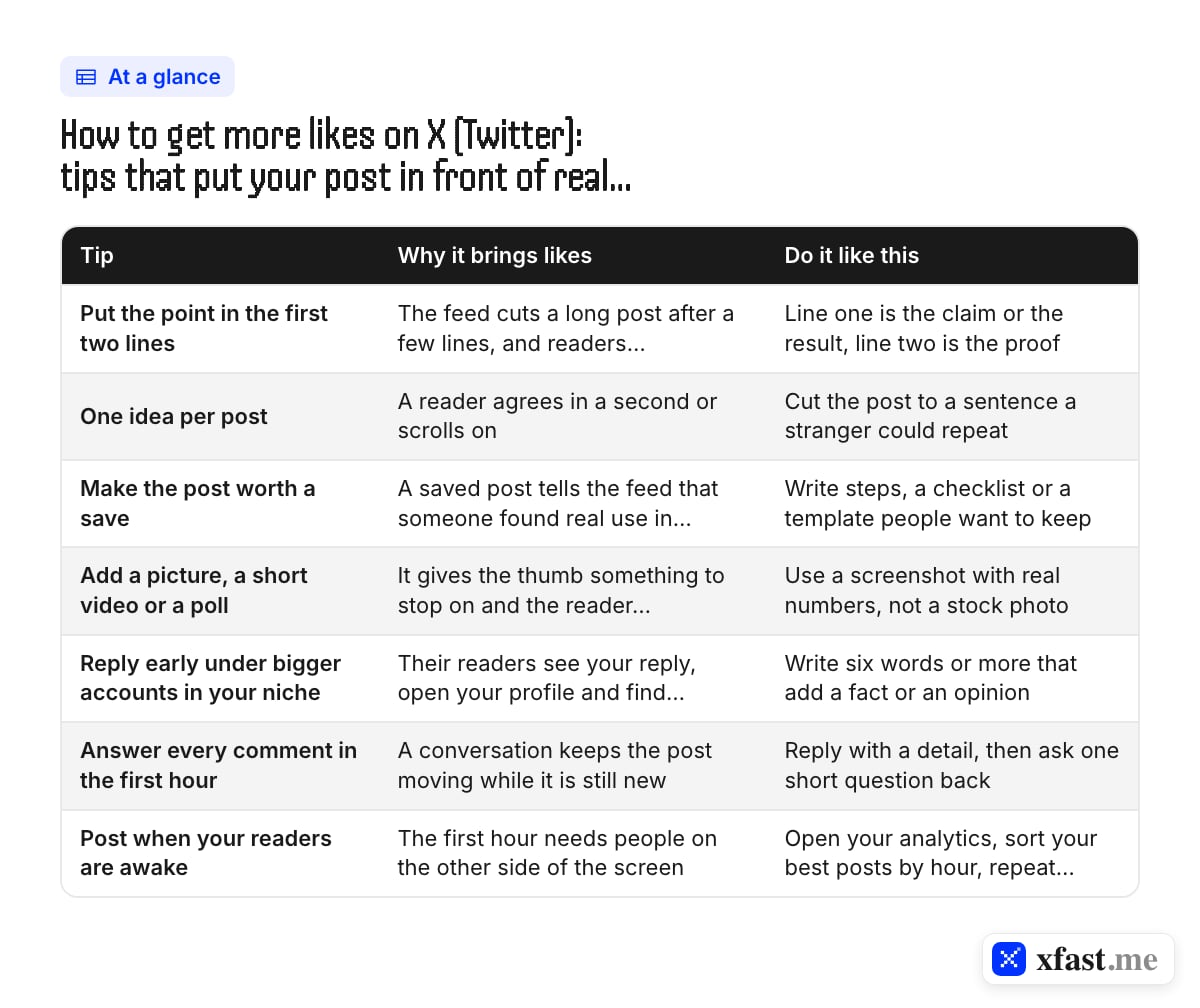
A like is the lightest reaction on X, so it follows reach: the more people open a post, the more of them press the heart. XFast gives free likes, comments, saves and follows with no conditions, from verified accounts of real people, by hand, and no X password is needed. The table below holds eight tips, and the sections after it show how to use the first hour.
| Tip | Why it brings likes | Do it like this |
|---|---|---|
| Put the point in the first two lines | The feed cuts a long post after a few lines, and readers decide there whether to open it | Line one is the claim or the result, line two is the proof |
| One idea per post | A reader agrees in a second or scrolls on | Cut the post to a sentence a stranger could repeat |
| Make the post worth a save | A saved post tells the feed that someone found real use in it | Write steps, a checklist or a template people want to keep |
| Add a picture, a short video or a poll | It gives the thumb something to stop on and the reader something to press | Use a screenshot with real numbers, not a stock photo |
| Reply early under bigger accounts in your niche | Their readers see your reply, open your profile and find your posts | Write six words or more that add a fact or an opinion |
| Answer every comment in the first hour | A conversation keeps the post moving while it is still new | Reply with a detail, then ask one short question back |
| Post when your readers are awake | The first hour needs people on the other side of the screen | Open your analytics, sort your best posts by hour, repeat that hour |
| Line up the first likes before you publish | Early likes show the post to the next circle of readers | Message three people you can reach, or use real members here |
The first hour decides how far a post goes, so plan it before you publish.
A post that gets reactions right after it goes out is shown to more people, and a post that sits quiet for an hour is rarely shown again. Our team has grown social accounts for more than 10 years, with more than 10 billion reach behind it, and this is the pattern we see on every network. Write the post, then clear the next hour for it.
Publish yourself, from your phone or the web. Auto-posted text loses reach, and you want to be on the screen when the first replies arrive.
Two lines are all most readers give a post, so write them first.
When the first two lines make a reader open the post and read it to the end, the feed takes that as a strong sign and shows the post to more people. Draft three versions of the opening, keep the one that names a result, and cut every warm-up phrase before it.
- Our X post generator gives you openings to start from.
- Our X post checker reads the draft before you press Post.
- Our X character counter shows where the post is cut in the feed.
A post that is opened, read, liked, saved and answered goes furthest.
One reader opens the post, stays on it, likes it, saves it and writes a comment. A post that collects that whole chain almost always moves on through the feed, to tens or hundreds of thousands of people around the topic. A bare like is the smallest piece of it.
Comments weigh differently. "Nice" and "great post" weigh nothing, and neither do comments from accounts that never read the post. A comment of six words or more that answers the point weighs a lot. A save is a strong sign that the material is useful to someone. Real readers repost a post that gathered early likes, comments and saves, so those three come first.
Ask people you can reach first, and use real members when you run out.
Ask colleagues, friends and the people you talk to every week, within minutes of publishing. It costs you time, and the replies you get are honest ones. Groups for like for like and follow for follow work the same way, but they give one-off favours, not a system.
If you have nobody to ask, XFast does it for free. Real members like, comment on and save your post by hand, from accounts with a photo and followers of their own. Reposts are not part of it, since those come from readers who see the early likes. For a two-way swap see like for like.
The rest of the usual advice fits in one line each.
- Post on a rhythm you can keep, and read how often to post on X for the numbers.
- Pin your best post and keep your bio specific, so a visitor from a reply stays.
- Use one or two relevant hashtags, or none.
- Put an outside link in a reply, so the post stays readable.
- Copy your three best posts: same topic, same format, same opening.
- Cover the wider picture in how to get more views on X.
Likes follow reach, and reach starts with the first people who see the post.
Myth: Likes come from posting more often.
Reality: Ten likes from real people in the first hour take a post further than fifty a day later.
Myth: A bigger account gets the likes by itself.
Reality: Every account starts a post from its first readers, and a small account with a sharp opening and quick replies keeps up.
Myth: A comment of any kind helps a post.
Reality: A comment that adds a fact or an opinion in six words or more is the one that counts.
Sixty minutes after posting decide the result, and this order uses them well.
- Before you publish, check the first two lines with the post checker and count the characters.
- Publish when your readers are awake, from your own phone or browser.
- In the first five minutes, message the three people you can reach and send the link to the post.
- In the same five minutes, ask for free likes, comments and saves from real members on XFast with the public link to the post.
- Stay on the post and answer each comment with a detail and a short question.
- Leave two replies of six words or more under bigger accounts in your niche.
- At minute sixty, open Post activity, see who liked, and thank the first people by name.
 Boost X post free with likes, replies and bookmarks from real people in the first hourBoost X post free by getting likes, replies and bookmarks from real people in the first hour. See the steps and where mutual swaps already run.
 Are X likes public? No, only you and the author of the post can see themAre X likes public? No. Since June 2024 only you and the author of the post see them. Here is who sees what, and what it means for your own posts.
 How to view likes on X (Twitter): your liked posts and the people who liked yoursHow to view likes on X (Twitter): find the posts you liked, see who liked your post and who reposted it, and fix a missing Likes tab in a few steps.